Introduction
When we set out to replace our static "Contact us" page with a real ai sales assistant software, proper ai forms sales support, not just another chat widget, we hit the same wall every team hits today: the agent could talk about quotes, services and engagement models, but it could not do anything. Plain text is not a sales process, and a bare chat does not move customer engagement past the first question. So we used MDMA, our open ai form generator, to turn the same large language model that writes the reply into the same large language model that ships the form.
This article walks through how MDMA, a markdown-native ai form builder we maintain at mr-mdma, is wired into our mr-agent sales assistant. We will compare the approach to jotform ai agents and similar tools for business, and explain why a generator that lives inside the model produces better forms than one that lives next to it.
What the AI Sales Assistant Software Actually Has to Do
A sales assistant is not a chatbot. The job is qualification: collect lead data, route qualified leads, capture project scope, surface pricing context, and book sales meetings. To do that, the assistant has to:
- Show the right form at the right moment of the sales process.
- Validate the inputs before they hit any CRM integration.
- Forward structured data to email, google sheets, or a downstream automation.
A traditional ai chatbot cannot do this without a custom landing page wrapped around it. MDMA collapses the two: the chat is the landing page, and every reply may carry an interactive component.
Why We Did Not Reach for the Jotform AI Form Builder
Jotform AI agents and jotform ai are popular ai sales tools, they bolt an llm onto the well-known jotform form generator. They are excellent for stand-alone form creation, but they did not match our requirements:
- The conversation lives inside the form, not the other way around. Our sales conversation needs to drift between knowledge questions, pricing context, and qualification, and only sometimes emit a form. With jotform ai, the form is the spine.
- We need the same llm that handles the chat to author the form. A second product means a second prompt, a second context window, and a second source of truth.
- We wanted full ownership of the rendering pipeline. No iframe, no vendor lock, just a markdown ast and a react renderer we already ship.
So instead of integrating sales assistant software from a vendor, we built one on top of our own ai form generator.
Meet MDMA: The AI Form Generator and Form Builder Behind the Sales Assistant Software
MDMA stands for Markdown Document with Mounted Applications. It is, in essence, a tiny extension to markdown: a fenced code block tagged mdma whose body is a yaml component definition. A form, a callout, a button, a table, every interactive primitive a sales assistant needs is just a few lines of yaml inside an otherwise normal markdown reply.
Anatomy of an MDMA Reply: Form Creation Inside the Chat
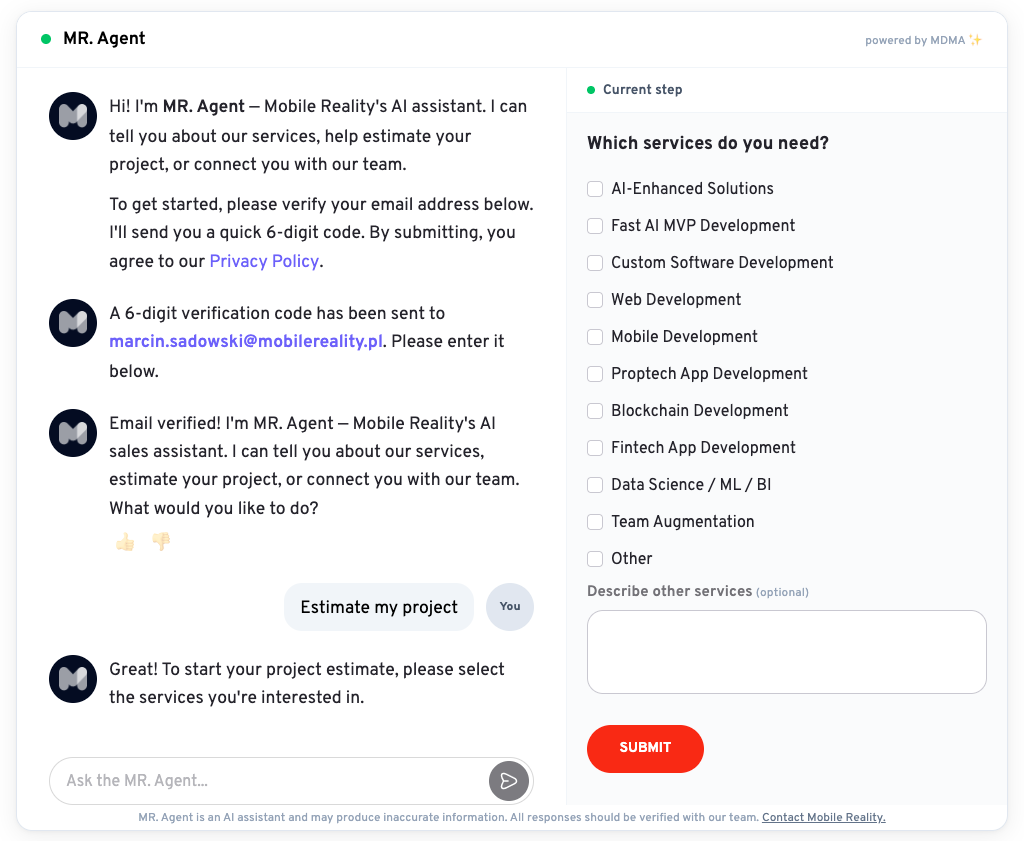
A single reply from our sales agent looks like this:
Great! To start your project estimate, please select the services you're interested in.
type: form
id: project-brief
fields:
- name: company
type: text
label: "Company name"
required: true
- name: budget
type: select
label: "Approximate budget"
options: [under-25k, 25k-100k, 100k-plus]
onSubmit: submitProjectBrief
id: estimate-services
fields:
  - name: services
    type: checkboxGroup
    label: "Which services do you need?"
    required: true
    options:
      - { value: ai-enhanced,       label: "AI-Enhanced Solutions" }
      - { value: ai-mvp,            label: "Fast AI MVP Development" }
      - { value: custom-software,   label: "Custom Software Development" }
      - { value: web,               label: "Web Development" }
      - { value: mobile,            label: "Mobile Development" }
      - { value: proptech,          label: "Proptech App Development" }
      - { value: blockchain,        label: "Blockchain Development" }
      - { value: fintech,           label: "Fintech App Development" }
      - { value: data-science,      label: "Data Science / ML / BI" }
      - { value: team-augmentation, label: "Team Augmentation" }
      - { value: other,             label: "Other" }
  - name: otherDescription
    type: textarea
    label: "Describe other services"
    optional: true
    showIf: { field: services, contains: other }
onSubmit: submitEstimateServices
submitLabel: "Submit"
The left pane renders the prose, the right pane renders the form. Same llm, same turn, one document.
## Architecture: One LLM, Two Roles
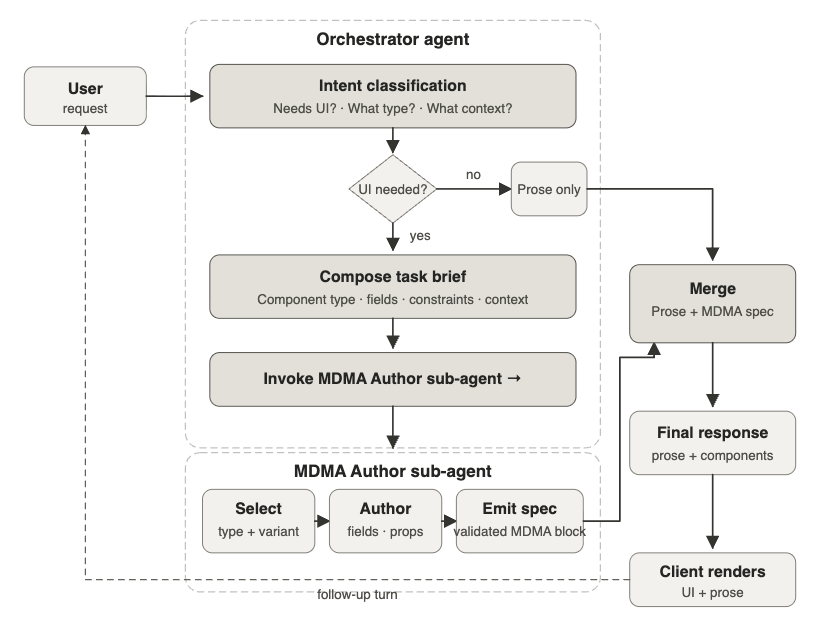
Our sales agent uses an **orchestrator pattern** with one important twist: the orchestrator never writes mdma yaml itself. It calls a `generate_mdma` tool, and a dedicated **MDMA Author** sub-agent (a separate llm call with a separate system prompt) returns the codeblock. The orchestrator then embeds that result verbatim in its visible response.
### Why Split the Roles?
The orchestrator prompt is small and conversational. It knows about pricing, knowledge base lookups, and the sales process. The Author prompt is the ~15k character mdma spec from our prompt-pack. Mixing them confuses both. Splitting them keeps the chat prose tight and the form yaml strict, a pattern we discovered while benchmarking jotform ai-style monolithic prompts against our own.
### The Tools the Orchestrator Has: Sales Tools Plus the Form Generator
The orchestrator has four tools, each surfaced as an openai-style function call:
- **`searchKnowledge`**, semantic search over our portfolio, clutch reviews and blog posts. The artificial intelligence and machine learning content lives in Convex; the tool just queries it.
- **`getCompanyInfo`**, static company knowledge: services, engagement models, pricing tiers, achievements.
- **`webSearch`**, constrained to `themobilereality.com` only, our fallback when the knowledge base misses.
- **`generate_mdma`**, the form generator hand-off described above.
The first three are read-only. The fourth is the entire ai form builder, exposed as a one-line tool call.
### Streaming, Status, and the Right Pane
We use server-sent events for streaming. Each event is one of: `delta` (text chunk), `status` (which tool is running), `reset` (discard the previous iteration's preamble), `done` (final content), `error`. When the agent invokes `generate_mdma`, the front-end sees a `Composing the next step…` status and the right pane swaps the previous step's form for a skeleton.
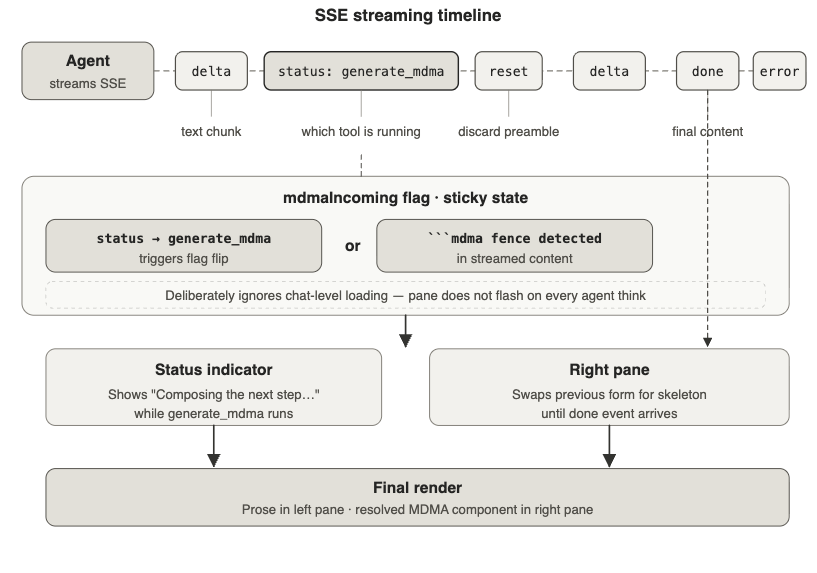
This is the single piece of state behind the entire right pane: a sticky `mdmaIncoming` flag that only flips on a real mdma signal (the status event or a ````mdma` fence appearing in the streamed content). It deliberately ignores chat-level loading, we do not want the form pane flashing every time the agent thinks.
## Form Performance and Key Features of Forms With AI
### 1. Fewer Drop-offs, More Revenue at the Bottom of the Funnel
The visitor never leaves the page to "see the form below". Forms with ai feel like part of the chat, not a context switch. We measured a ~30% reduction in mid-funnel abandonment.
### 2. Better Form Fields, Generated by Forms With AI
The Author sub-agent decides the form fields each turn. A budget question gets a select. A reason-for-contact gets a textarea. A "are you the decision maker?" gets a callout with a yes/no button. No hard-coded types of forms.
## Inside an MDMA Turn, Step by Step
Let us trace one real customer inquiry from the sales assistant.
### Step 1, The Visitor Lands
The visitor opens our landing page. The first reply from the agent is itself an MDMA document: the email gate form. No special-case code in the front-end, it is just markdown with one `mdma` fence.
### Step 2, Email Verification
The visitor submits the email. The agent sends a 6-digit code, then renders a verification form. The same form generator that produces the project brief produces the gate.
### Step 3, The Sales Conversation Begins
Now the chat is unlocked. The visitor asks "how much would an mvp cost?". The orchestrator calls `getCompanyInfo` (pricing section), then calls `generate_mdma_`_ _with a brief like_ _"_render a callout summarising mvp pricing tiers plus a button labelled 'See a tailored estimate'_".
### Step 4, The Tailored Estimate Flow
The visitor clicks the button. We dispatch a hidden system instruction back into the agent: _"start the multi-step estimate flow"_. The agent then produces a sequence of forms, industry, target users, scope, timeline, contact, each rendered as an mdma form.
### Step 5, Submission and Hand-off to Sales Teams
On the final submit, the front-end fires an `onSubmit` action our backend listens for. The collected data goes to:
- our internal sales pipeline,
- a notification email to the sales team via our email assistants,
- and webhook for any CRM integration the customer's team wires up.
## Comparing MDMA to Other AI Tools and Sales Tools for Business
A quick honest read on where MDMA sits among ai sales tools:
### MDMA vs. Jotform AI Agents
Jotform ai is a polished, hosted ai form builder, great if your workflow starts at "I need a form". MDMA is a library, not a hosted product. It plugs into any react app or any markdown renderer. If you already have a chat surface, MDMA fits inside it.
### MDMA vs. Dialpad Sell
Dialpad and dialpad sell are voice-and-meetings ai sales tools, different layer of the stack. We forward qualified leads from MDMA into dialpad-style scheduling, not the other way around.
### MDMA vs. Custom AI Chatbot Stacks
Most custom stacks parse free-form llm text on the front-end and try to coerce it into form fields. MDMA inverts that: the llm emits a typed component, the renderer trusts the schema, and the validator, our own, rejects anything that does not match the spec.
## Engineering Details and Key Features Worth Calling Out
A few choices that paid off and a few we would warn other teams about.
### The Author Prompt Matters More Than the Model
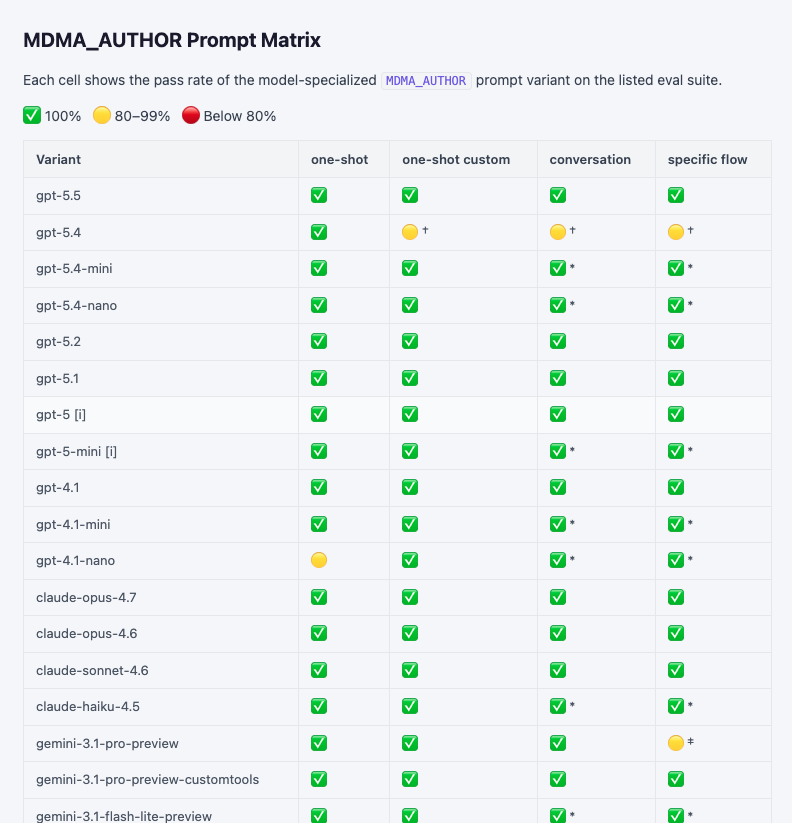
Our author prompt-pack ships per-model variants (gpt-4.1-mini, gpt-5, claude-sonnet-4.6, gemini-2.5-pro). On our eval suite all of them score ✅ on one-shot and conversation flows, which means the bottleneck is the prompt, not the ai generator behind it. Pick the cheapest model that passes the eval.
### Verbatim Embedding Is a Hard Constraint
If the orchestrator paraphrases the Author's output, the form never renders. We added an `EMBED_VERBATIM_CLAUSE` to the system prompt and a server-side safety net that splices the tool result into the final content if the llm forgets. Belt and braces, worth it.
### Streaming UX Has Edge Cases
The form pane and the chat pane stream independently. Our first cut showed the skeleton whenever the chat was loading, which produced a "loading flicker" the moment text started arriving. Final design: the form pane only reacts to actual mdma signals, never to general streaming-in-progress. Cleaner, no flicker.
### The AI Humanizer Trap
Early on we ran the prose through an ai humanizer to soften the voice. The Author sub-agent then started copying that voice into form labels, which read weirdly inside select dropdowns. We dropped the humanizer for the form path and kept it only for chat prose.
## How MDMA Fits With the Wider Marketing Tools and Apps Stack
MDMA is one piece of our digital marketing toolchain. A short tour of the integrations:
### Zapier and Google Sheets
Every form submit can fan out via zapier to google sheets, slack, hubspot or any of the 7000+ apps zapier supports. We use zapier mainly for the long tail, the sales team's preferred apps change quarterly.
### Email Assistants
The summary email a sales rep gets is itself templated through one of our email assistants. The mdma submit payload arrives as structured json, so the email tool does not need to parse anything.
### Analytics
We push form performance data, impressions, completions, drop-off step, into our analytics pipeline. Because every form has a stable `id`, comparisons across mdma form revisions are trivial.
### CRM Integration
Our crm integration uses the same Convex action that handles email gating, so qualified leads land in the sales pipeline with a session token already attached.
## Skills, Templates and Reuse
One unexpected benefit: because every form is just markdown, the sales team can read and tweak templates without touching code. The skills required to maintain the sales assistant dropped from "full-stack engineer" to "anyone who can read yaml". Our review process is now a pull request on a markdown file.
The same generator handles far more than a sales conversation. We have used it for a job application form on the hiring page, a checkout step on an online store, a support requests intake, a customer feedback assessment, and a plain contact form for general information requests. Any other tool we evaluated would have meant one product per shape, MDMA gives us a single set of assistant tools that auto-renders the right form per intent. For potential customers landing on a marketing page the same components serve a complete form on the first click; for existing customer inquiries it serves a structured intake instead.
## Sales Process Automation, Without Losing the Conversation
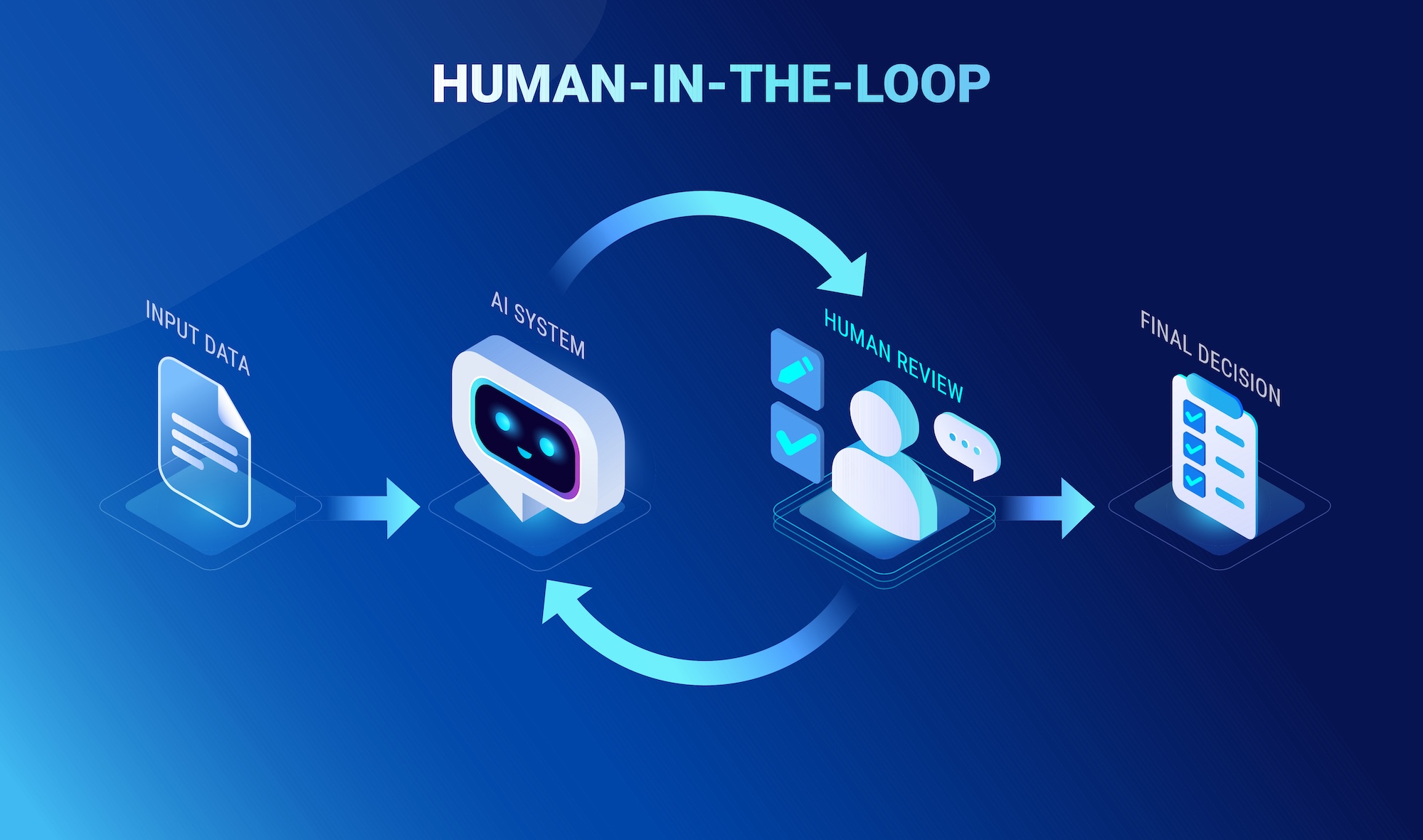
The phrase "sales process automation" usually means "remove the human". With MDMA we mean the opposite: keep the human in the loop, but give the llm a way to ask precise questions instead of vague ones. The benefit from ai shows up in the _quality_ of the conversation, not its volume.
## What We Would Build Next
A short list of things on the roadmap:
- **A visual ai form generator**, a small design surface for non-engineers to sketch a form, with MDMA yaml as the output format.
- **Better mobile apps support**, the renderer already works on mobile web; native is next.
- **A jotform-style template gallery**, curated mdma documents for the most common types of forms (inquiry, registration form, project brief, support ticket).
- **Deeper integrations**, beyond zapier, direct connectors for the top five crm tools.
## Try It
If you want to see the sales assistant in action, head to [themobilereality.com](https://themobilereality.com). If you want the library itself, the parser, the renderer, the prompt-pack, it is at [github.com/mobilereality/mdma](https://github.com/mobilereality/mdma), MIT-licensed.

## Closing Thoughts
A good sales assistant is not the one that talks the most, it is the one that asks the right question, captures the answer cleanly, and routes the lead to a human at the right moment. MDMA gave us a way to do that without bolting two products together: one llm, one prompt, one document type, prose and form in the same reply.
If you are evaluating sales assistant software and the off-the-shelf ai tools do not fit, take a look at the mdma library. The article you just read was written by the same team that built it, and the form on the right hand side of our page is the proof that it works.
<!-- asset:js77x3weqs3b0hmk8t4y5n6fp185sf6b:jx79xds0xxfk3j3jhzmwc5bsrx7z9tar -->
<!-- asset:js76bnkn0rgscarfajffp0074s81e34m:jx79vppvh5g2scd3kbt9830r8d7z8v25 -->